YBA Values 2026: How to Check Trades Safely
Use this YBA values checklist to verify a trade: compare exact items, date community tiers, check demand, and avoid Roblox trading scams before you accept.
YBA Values 2026: The Fast Answer
YBA values are community estimates, not official prices. For a trade you are about to accept, check the exact item names in the live Roblox window, compare the current YBA Trading Tier List, and use a W/L calculator only as a second opinion. If the sources disagree, pause instead of treating the highest or lowest number as fact.
Update 1.8 added Crazy Diamond Requiem and Diver Down to the live game, so demand can move faster than an older value page. The official Your Bizarre Adventure Roblox page confirms the update and directs players to in-game patch notes, but it does not publish a permanent value list.
| Before accepting | What to verify |
|---|---|
| Item identity | The full stand or skin name shown in the trade window |
| Market context | A current tier band plus recent player demand |
| Offer balance | Both sides match the promise, including adds |
| Safety | No password, payment, script, or rushed off-platform request |
The practical answer is not a permanent price sheet: it is a short record of what you checked before you accepted. Open the official game listing first so you know you are in the intended experience, read the exact item names in the in-game trade window, and date any community tier reference you use. A value label without an item name, source, or date is not enough evidence for a hard-to-replace trade.
Why YBA Values Matter in Your Bizarre Adventure
YBA values are the community's shorthand for estimating what a stand, item, or trade is worth in Your Bizarre Adventure. If you trade without checking them, you can lose a valuable stand for something much cheaper. This guide explains how to read YBA values, verify them, and make safer decisions without relying on guesses.
Your Bizarre Adventure is a Roblox game where stands and items change hands constantly. The official Your Bizarre Adventure Roblox experience page is the best place to confirm the game is live and read official notices, but it does not publish a permanent price list. That is why players turn to community-run value resources. According to a search-result summary for one community value site, such tools may include tier lists, player inventories, a Find a User feature, and a trade calculator that checks whether a trade is a W, L, or Fair. Treat those tools as player-made references, not official rulings.
| Tool or feature | What it usually does | Why it helps | Verification step |
|---|---|---|---|
| Tier list | Ranks stand value by tier using community reports | Gives you a quick starting point | Cross-check with several recent player opinions |
| Player inventory lookup | Shows items a player owns, according to site data | Helps you see what a trader may offer | Confirm everything in the actual Roblox trade window |
| Find a User | Searches for a player profile on the value site | Makes it easier to review a trader before accepting | Never rely only on a username; use the in-game trade UI |
| Trade calculator | Labels a trade W, L, or Fair | Gives a second opinion on value balance | Recheck demand and item availability in-game |
One important lesson is that YBA values are not fixed. Community tier lists and calculators can lag behind demand, updates, or rarity changes. The search-result summary confirms that a value site can rank stands and check trades, but it does not prove that every value is current. Exact live values are unavailable in the source material for this guide, so use verification steps instead of treating any single number as permanent.
- Check the full trade window before accepting.
- Compare both sides by exact item name.
- Confirm that the offered items are real and tradable.
- Ask for time if the other player rushes you.
- Walk away if the value source cannot be explained.
YBA Values: The Quick Trade Answer
Before you accept a YBA trade, compare three things: the exact in-game item name, the demand you can see in current player offers, and at least one current community value reference. A tier list is useful for orientation, while a calculator can give a second opinion on one offer. Neither replaces the Roblox trade window, which is the final confirmation of what is actually being exchanged.
| Check | What to confirm | Best next step |
|---|---|---|
| Exact item | The full item or skin name on both sides | Read the live trade window, not a nickname |
| Current demand | Whether players are actively seeking the item | Compare more than one recent offer |
| Community reference | Its current tier or value band | Use it as a range, not an automatic verdict |
| Final trade | The items that are actually attached | Cancel if anything differs from the promise |
For cosmetic demand, compare the current YBA Skin Tier List before treating a visual ranking as a price. When an Arrow is part of the offer, check the YBA Requiem Arrow Trading Guide as well.
How to Read YBA Values Without Getting Scammed
The biggest mistake is treating one YBA values page as absolute truth. Community values are estimates. They can be useful, but they cannot replace the Roblox trade window, which shows exactly what is being exchanged. A calculator that says "Fair" does not guarantee that you personally want the trade. It only means that the numbers entered into that calculator are roughly balanced according to its data.
Use a simple rule: value checks are research, not permission. If a trade looks balanced on a tier list but feels rushed or confusing, slow down. If a player refuses to let you verify items, that is a warning sign. If they quote a value from a source you cannot inspect, ask them to explain it. Good traders can handle questions.
| Warning sign | What it may mean | Safer response |
|---|---|---|
| "My value site says this is a W" | The trader may be using one source as absolute truth | Ask which source and when it was last updated |
| Extreme rush to accept | Pressure to skip verification | Slow down; a fair trade can wait |
| Inventory mismatch | The site profile may be outdated or inaccurate | Verify items in the official trade window |
| Unusual add-ons | Hidden value differences | Recalculate with a second method |
| Refusal to explain | The trader may be hiding something | Decline and find another offer |
Community reports about YBA values can change quickly. A stand that was hard to get last month may become more common after an update or a demand shift. A trade calculator can only be as good as the values fed into it. That is why you should compare more than one signal: a tier list, recent player opinions, and the actual items in the trade window.
- Use tier lists to understand broad ranges.
- Use trade calculators to check one specific offer.
- Use in-game evidence to confirm the items exist.
- Use patience to avoid pressure-based mistakes.
Tier Lists vs Trade Calculators: Key Differences
Tier lists and trade calculators answer different questions. A tier list helps you understand where a stand generally sits in the community value conversation. A trade calculator helps you judge a specific offer by comparing both sides. Neither one is a law. They are tools for making a more informed decision.
According to the search-result summary, a community value site may describe its tier list as browsing every stand's value ranked by tier. That is useful for orientation. The same summary mentions a trade calculator that checks if a trade is a W, L, or Fair. That is useful for a final sanity check. The weakness is that both tools depend on player-reported data.
| Comparison point | Tier list | Trade calculator |
|---|---|---|
| Main purpose | Rank relative stand value | Judge a specific offer |
| Input | Community rankings and reports | Items or stands on both sides |
| Best use | Learning broad value bands | Checking one trade before accepting |
| Weakness | May be slow to update | Depends on the values it is fed |
| How to verify | Compare several player opinions | Confirm with in-game demand and the trade window |
If a tier list says one stand is high value and a calculator says your trade is Fair, do not stop there. Ask whether the calculator is using current values. Ask whether the other player is offering an item that is in demand. Ask whether you actually want the trade. YBA values are a guide, but your goals matter too. A fair trade can still be a bad trade if you give up something you enjoy.
Practical Trade Checking Workflow
You do not need a complicated spreadsheet to check YBA values. You need a repeatable process. Start by identifying exact item names. Nicknames and slang can cause confusion. Then check a community tier list for a broad range. Then run a trade calculator if one is available. Finally, confirm everything in the Roblox trade window before you press accept.
| Step | Action | Evidence check |
|---|---|---|
| 1 | Identify exact item names on both sides | Use the in-game trade window, not nicknames |
| 2 | Check a community tier list | Note the tier or value band, not one exact number |
| 3 | Run a trade calculator | Record whether it says W, L, or Fair |
| 4 | Compare demand and availability | Ask trusted players or check recent listings if available |
| 5 | Decide without pressure | Decline if anything feels unclear |
This workflow will not tell you the future. It will, however, reduce avoidable mistakes. If you cannot find a value for an item, say so. "I cannot verify this" is a valid reason to decline. You can also ask the other player to wait while you check. Honest traders usually understand.
- Never accept a trade just because a calculator says W.
- Never decline a trade just because a tier list looks scary.
- Never use a value site as your only source.
- Never let a stranger define what your items are worth.
Build a Dated Value Check Before You Trade
Players often lose the context that made a trade look reasonable. A screenshot of a tier list can be old, an abbreviated skin name can point to the wrong cosmetic, and a W/L result may assume adds that are no longer in the window. Keeping a compact dated note takes less time than recovering from a bad trade. It also makes it easier to explain why you declined without arguing over a number.
Use the following record for the specific offer in front of you. Do not copy it forward as a permanent valuation; it is evidence for one decision at one time.
| Record field | What to write down | Why it matters |
|---|---|---|
| Date and game context | The day you checked and the visible live update context | Community demand can move after an update or hotfix |
| Your exact items | Full names exactly as the trade UI displays them | Similar names and skins are easy to confuse |
| Their exact items | Full names and every add, not the promise in chat | The final window, not a message, is the trade |
| Community reference | The source name, its update date if shown, and its tier band | A tier is a time-stamped opinion, not an official price |
| Demand evidence | What you actually observed in recent player offers | Demand and listed rarity are not the same thing |
| Decision | Accept, decline, or wait, plus the reason | Stops pressure from replacing your own goals |
The official Roblox experience listing is the anchor for the first field because it identifies the real YBA experience and points players toward live update information. It does not validate a price, a rarity, or a skin tier. That distinction is useful: official sources tell you what the game currently recognizes, while a community value resource can only help you estimate how players are discussing an item.
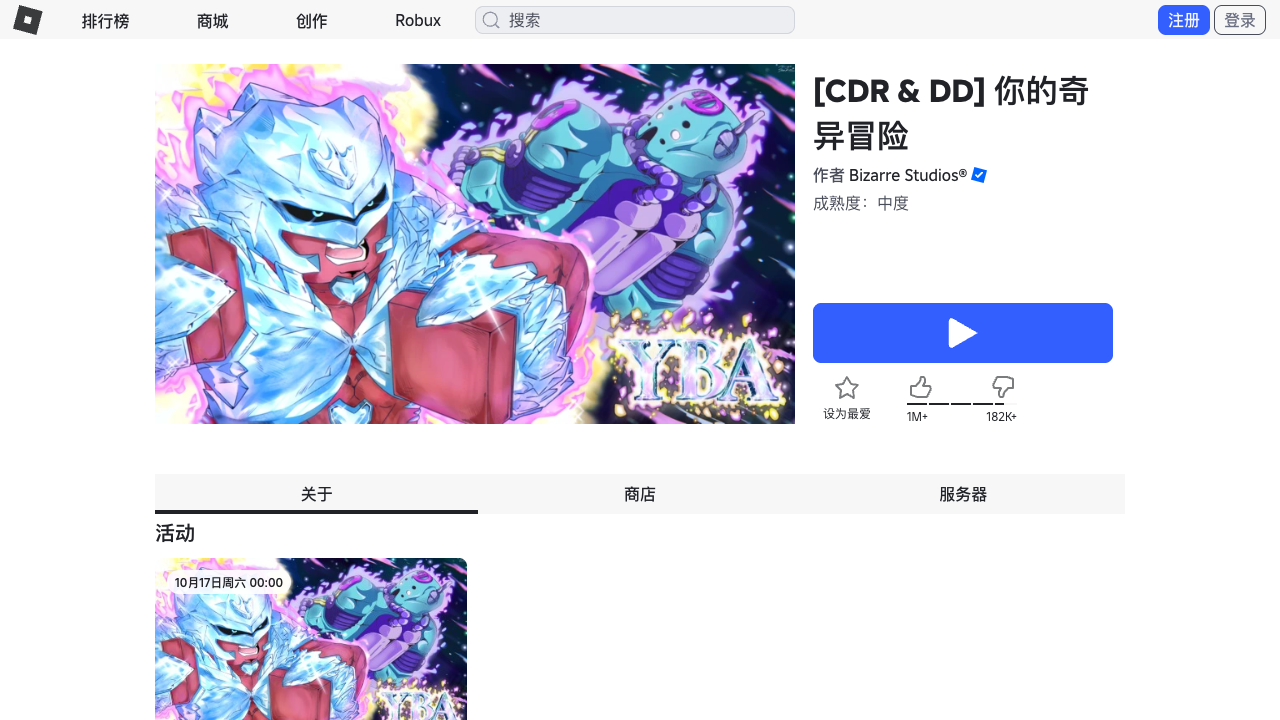
Source: Your Bizarre Adventure on Roblox, captured October 16, 2026. This official listing confirms the intended experience and Update 1.8 release context; it does not publish a value table, a drop rate, or a guaranteed trade outcome.
Check the Trade Window Twice: Before and After Adds
The safest part of a YBA values check is also the least glamorous: read the live trade window slowly. Do it once when the offer is first proposed and again after the other player says they are "just adding one thing" or "cleaning up the offer." A value tool cannot see a last-second swap, a missing add, or an item that was described with a nickname in chat.
- Freeze the claim. Ask the other player to state the full offer in the trade window. Do not rely on a screenshot, profile page, or Discord message from another time.
- Read every displayed name. Compare each item, stand, skin, and add against the exact names you recorded. If a name is truncated or unfamiliar, stop and look it up through the live UI or a dated community reference.
- Separate collection value from play value. A skin can be visually desirable without being the best choice for your current stand, build, or goal. A community tier cannot decide whether you will regret giving it away.
- Run the second-opinion check. Compare a current tier band and a calculator result only after entering the exact final offer. If the tools disagree, that is a reason to wait, not a reason to choose whichever answer favors the trade.
- Re-read after any edit. Every add, removal, server hop, or changed promise restarts the check. Cancel and restart if the final window differs from your note.
Never leave Roblox to "verify" a trade through a login page, executable, script, browser extension, payment offer, or account-sharing request. A legitimate trading decision can be made from the in-game window, the official Roblox experience page, and clearly labeled community discussion. The moment a player needs your password, cookie, account code, or a download, the trade is no longer worth evaluating.
What Update 1.8 Changes, and What It Does Not Prove
The official experience listing identifies Update 1.8 and names Crazy Diamond Requiem and Diver Down. That can affect player attention because new content often creates fresh demand, experimentation, and debate. It does not establish a permanent price for either Stand, a skin ranking, a probability, or a guarantee that a particular trade is favorable. Treat a sudden spike in messages as a signal to collect better evidence, not as proof that an item has a fixed value.
If your trade includes either new Stand or a related skin, take an extra minute to divide the question into three parts:
| Question | Safe evidence | What not to assume |
|---|---|---|
| Does the item exist in the current game? | Official Roblox listing, live client, or dated official notes | That existence proves its exact trade value |
| What are players currently asking for? | More than one current, dated player offer | That one loud trader sets the market |
| Is this a good trade for you? | Your collection goal, build plan, and replacement risk | That a W/L label makes the choice for you |
For gameplay context, start with the Diver Down guide or the Crazy Diamond Requiem guide. For cosmetics, use the YBA Skin Tier List as a community opinion and cross-check the exact skin in the live window. These routes keep a broad "YBA values" search from mixing up acquisition, combat usefulness, skin appeal, and negotiated trade demand.
Video context: use this official-resource video to identify YBA's live presentation and follow its official links. It is not evidence of a current value, trade tier, probability, or item guarantee. Viewed October 18, 2026.
A Source Ladder for Values, Skins, and Private-Server Claims
Not all useful information answers the same question. Use a source ladder so a community opinion does not accidentally become an official claim in your own notes. This is especially important when a trader says a value is "confirmed" but cannot show where that confirmation came from.
| Evidence level | Useful for | Not sufficient for |
|---|---|---|
| Official Roblox page and developer announcements | Identifying the genuine experience, update context, and official directions | A permanent value chart or dynamic player demand |
| Your live in-game UI and trade window | Confirming the exact items currently attached to an offer | Proving that a community tier will hold tomorrow |
| Dated community tier lists and calculators | A second opinion about player sentiment | A developer-backed price, probability, or guarantee |
| Videos, screenshots, and chat claims | Finding leads and examples to verify | The sole basis for a high-value trade |
Private servers belong in a separate safety check. They can give you a quieter place to test mechanics or talk with known players, but they do not make an item legitimate, guarantee a spawn, or turn an off-platform payment into a safe trade. Read the YBA private server guide for the platform and account-safety boundaries. For a specific Arrow offer, use the Requiem Arrow trading guide and still verify the final item in the trade window.
When to Decline, Wait, or Ask for a Second Check
Declining is a complete trading decision. You do not need to prove that another player is dishonest before you protect an item you cannot confidently replace. Wait when the value source is undated, the offer changes during the conversation, the other player will not give you time to inspect it, or the item is tied to a new update that has not settled into clear community discussion.
Ask for a second check when the only disagreement is between two dated community sources. State the exact item names, compare the final offer again, and choose the option that you can live with even if the market changes. Do not ask strangers for a password, account access, or downloaded tool to settle a trade. The more a decision depends on secrecy, speed, or off-platform contact, the less it is a legitimate value check.
FAQ: YBA Values and Trading Questions
Are YBA values official? No. YBA values are community estimates. The official Roblox experience page does not publish a permanent value list. Community sites and calculators may track player opinions, but they are not official rulings. Always verify a trade in the in-game window.
How often do YBA values change? They can change whenever player demand, availability, or game updates shift. No single schedule applies. A tier list or calculator may be outdated quickly. Check more than one recent player opinion before accepting a high-value trade.
Can a trade calculator guarantee a fair trade? No. A calculator can label a trade W, L, or Fair based on its data, but it cannot guarantee that the data is current or that the trade fits your goals. Use it as a second opinion, not as a final answer.
What should I do if I cannot find a value for an item? Do not guess. Ask trusted players, wait for more information, or decline the trade. If a player pressures you, that is a sign to slow down. YBA values are meant to help you make decisions, not force you into one.
Related Guides
YBA Requiem Arrow Trading Guide: Prices and Safety
Learn how to check YBA Requiem Arrow trades, compare shop prices with offers, and avoid rushed or unsafe exchanges in Your Bizarre Adventure.
YBA Trading Guide 2026: How to Trade Safely and Fairly
Learn how to trade in YBA with a practical 2026 workflow for value checks, fair offers, trade safety, and current Update 1.8 demand changes in Roblox.
YBA Trading Safety Guide: Check Every Roblox Trade Before You Accept
Use this YBA trading safety guide to verify items, avoid pressure, and make better Your Bizarre Adventure trade decisions inside the official Roblox window.